Cast shadows on a transparent plane
A shader was released for an older release of Three.js that no longer works. I know basically nothing about shaders so I'm unable to fix it myself.
But I'm going to take a look at ShadowMesh. Haven't tested if it works on transparent planes yet, but it seems like it does.
I won't need shadows on a transparent plane if I get the next item to work.
Fixed UI elements within a scene - non-HTML
My scene will have a camera that will be constantly moving, but I'd like to place objects/sprites in fixed parts of the screen. A HUD.
HTML isn't working so well because I need certain graphic objects -- but not all -- to stay on top of the HUD.
My Google-fu gave me nothing conclusive in this matter, and several sources recommended going HTML. If I do, I will need to resort to using layers. Those layers would be, from front to back:
- HTML layer: special bars (the little blue ones at the bottom of the screen), black background (for fade-ins/outs), and all prompts (Round 1/2/3, Fight, KO, etc).
- Canvas layer: character renders and their shadows on a transparent plane on the ground.
- HTML layer: health bars.
- Canvas layer: background stage render.
With the above setup I need two scenes, but I believe I only need one camera for both, so the stage layer and the fighters layer would play together nicely.
As for the extra layer for the health bars, that's how most fighting games work:

When a character jumps up enough to reach the health bars, they appear in front, as in the image above (see Laura's hand).
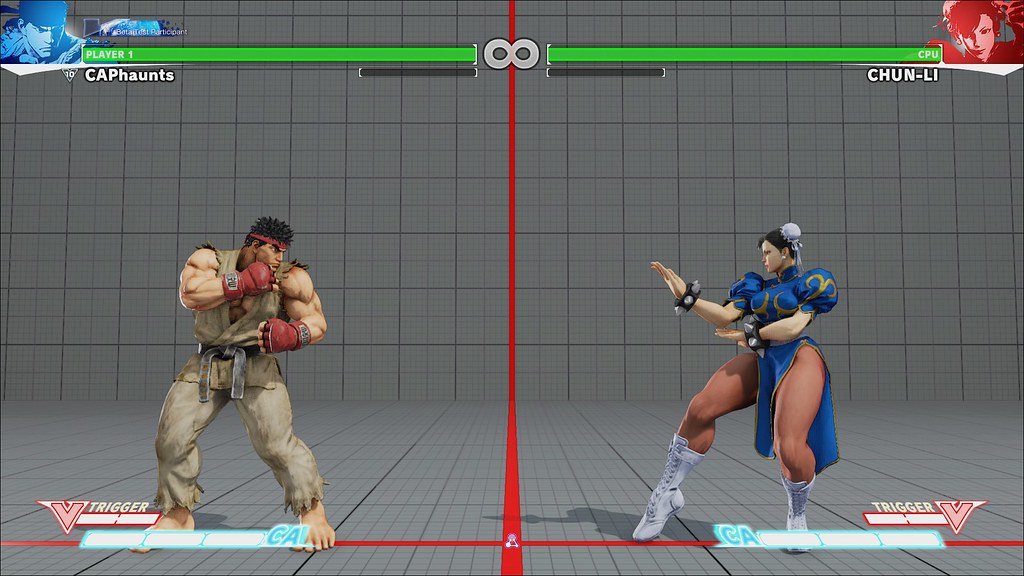
Meanwhile, the little special bars stay in the front, covering their feet.
So I can't have the special bars and the health bars in the same layer, as the character models have to be placed between them.
Using layers would be fine except for one thing: limited shadows. Shadows cast on a transparent plane would seamlessly look well on the top of the background layer; however, this limits my choices. What if I want to have a wall in the stage, and want the characters' shadows to be cast onto it? I wouldn't be able to do that using layers, unless I resort to multiple transparent planes, but that's already sounding like a lot of work.
So my ideal approach would be to render a single layer, just one canvas, and place the HUD elements inside, having those elements not moving with the camera and being able to stay in front or behind a certain Z coordinate in the scene. I'm still researching about it while I work in other stuff.
Particles
This will be interesting. I need particles for quite some essential stuff in this game. Namely, hit/block sparks, projectiles, possibly trails, and other effects.
My current plan is to place several emitters along the character's body or a projectile geometry. Then I would turn those emitters on and off during certain animations to get them more visually appealing. As part of the customization process, players would be able to customize those emissions to their liking.
As for trails, there's another option, other than particles. I found this blog post in German a while ago. It creates a plane mesh that follows an emitter. It does sound a bit complex to me still, as I'm not entirely familiar with computer graphics yet. But I think it might play well with what I have in mind.
Implementing a "Pause" mechanic for Tweens
The Tween.js library I'm using relies on a global update() call that allows receiving a parameter with the time. I can implement a "Pause" mechanic by adding to that parameter the amount of time the animation has been paused, and keep that amount in memory until the scene ends. However, I need to be able to keep running certain tweens and pause others for situations where one character executes a special move that freezes the entire screen. That character needs to animate alone (the cinematic effect), so I have to find a way to update tweens independently, or be able to pass different timestamps/deltas onto them. I think I might be able to do it with the current library, but that will require a bit of research into the source code, as it's not mentioned in the documentation.
Build Editors for everything
The Administration interface to create Poses, Animations, Skills, even Geometries. This is going to be a huge amount of work. I'm placing them last in my list though, and will make do with content built manually for now.

